en

Duotone

Map an image locally onto two colours - shadows in one, highlights in the other. No upload.

Shadow hue
Highlight hue

Your files

    Running locally on your device ...

    0%

    Your files never left your device

      Is my file uploaded?

      No. Everything runs in your browser - your file never leaves your device. How this is verifiable
      No upload100% local
      Your content stays with youno third-party access
      Servers in GermanyGDPR by design
      Independently auditedTLS A+ · HTTP headers A+

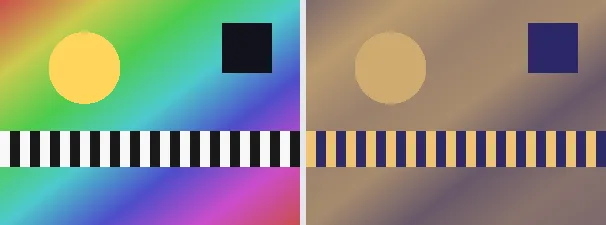
      A duotone maps the brightness of an image onto a gradient between exactly two colours: the dark areas take a deep shadow tone, the bright areas a vivid highlight tone, and the midtones blend in between. The original colours are fully replaced by the two chosen hues.

      The duotone look is familiar from posters, music covers and modern web design (for example a strong blue paired with a warm orange). Two sliders let you pick the shadow and highlight hue freely on the colour wheel. The result is an atmospheric, graphic image with a clear colour identity. The output keeps your original format and dimensions.

      Everything runs entirely locally in your browser on a canvas (no upload, even offline) - your image never leaves your device. The luminance of each pixel is computed and then interpolated between the shadow and highlight colour. Animated images are flattened to a single frame.

      Specifications

      Specifications
      Input formatsJPG, JPEG, PNG, WEBP
      Output formatJPG
      Batch processingYes
      ProcessingLocally in your browser (JavaScript)
      File uploadNone

      In 3 steps

      1. Drop or tap your image (PNG, JPEG or WebP).
      2. Choose the shadow and highlight hue (each 0 to 360 degrees).
      3. Download the duotone image (several at once as a ZIP).

      Limitations: Maps the luminance of each pixel onto a gradient between a dark shadow colour (shadow hue) and a light highlight colour (highlight hue); the original colours are lost. The original format and dimensions are preserved (PNG keeps transparency; JPEG flattens onto white). Animated inputs are reduced to a single frame.

      FAQ

      Is my image uploaded?

      No. The duotone effect runs entirely locally in the browser on a canvas - even offline. Your image never leaves your device.

      How is it different from tinting?

      Tinting uses a single hue; a duotone maps shadows and highlights onto two different colours and therefore looks more contrasty.

      Are the original colours kept?

      No, and that is intended: only the brightness matters, the colour comes from the two chosen tones.

      Does it keep my format and size?

      Yes. A PNG stays a PNG (with transparency), a JPEG stays a JPEG, and the dimensions are unchanged.

      Related tools