en

Sepia Image

Give an image a warm sepia tone locally - a vintage brown photo look, format preserved. No upload.

Your files

    Running locally on your device ...

    0%

    Your files never left your device

      Is my file uploaded?

      No. Everything runs in your browser - your file never leaves your device. How this is verifiable
      No upload100% local
      Your content stays with youno third-party access
      Servers in GermanyGDPR by design
      Independently auditedTLS A+ · HTTP headers A+

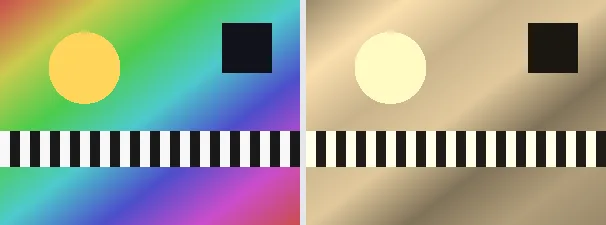
      Sepia replaces an image's colours with warm brown tones reminiscent of antique photographs. This tool uses the classic sepia matrix: each output channel is a fixed blend of the original red, green and blue (for example the new red is about 0.39 red + 0.77 green + 0.19 blue), which produces the familiar aged, sun-warmed brown rather than a flat tint over gray.

      A sepia tone is a quick way to give photos a nostalgic, timeless feel, to unify a set of images under one warm palette, or to soften a harsh snapshot. The output keeps your original format and dimensions - a PNG stays a PNG (transparency preserved), a JPEG stays a JPEG - so it slots straight back into your layout.

      Everything runs entirely locally in your browser on a canvas (no upload, even offline) - your image never leaves your device. The effect is a fixed per-pixel matrix, so it is exact and repeatable. Animated images are flattened to a single frame; for plain black and white use the grayscale tool instead.

      Specifications

      Specifications
      Input formatsJPG, JPEG, PNG, WEBP
      Output formatJPG
      Batch processingYes
      ProcessingLocally in your browser (JavaScript)
      File uploadNone

      In 3 steps

      1. Drop or tap your image (PNG, JPEG or WebP).
      2. The classic sepia matrix is applied per pixel on a canvas.
      3. Download the sepia image (several at once as a ZIP).

      Limitations: Applies the classic sepia matrix per pixel to give a warm brown vintage tone; alpha is kept. The original format and dimensions are preserved (PNG keeps transparency; JPEG flattens onto white). Animated inputs are reduced to a single frame. It is a fixed transform with no settings.

      FAQ

      Is my image uploaded?

      No. The effect runs entirely locally in the browser on a canvas - even offline. Your image never leaves your device.

      How is sepia different from grayscale?

      Grayscale removes all colour; sepia replaces it with a warm brown palette via a fixed matrix, for an aged-photo look rather than neutral gray.

      Does it keep my format and transparency?

      Yes. A PNG stays a PNG with its transparency; a JPEG stays a JPEG (flattened onto white). Dimensions are unchanged.

      Can I undo it?

      No. Sepia blends the colour channels and cannot be reversed exactly, so keep your original if you need it back.

      Related tools