No processing of your file contents takes place on any server. You need no data-processing agreement with gottrix to handle confidential or business documents.
Hosted in GermanyGlobal Content Delivery
Origin servers at Hetzner in Germany, delivered worldwide through a content delivery network. Your file contents are never transmitted in the process - they never leave your device.
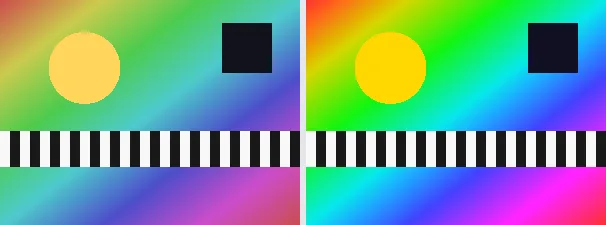
Saturation controls how intense the colours are. This tool lets you push colours to be more vivid or pull them toward grey with a single slider from -100 to +100. At 0 the image is unchanged; at -100 it becomes fully greyscale; positive values make the colours pop.
Adjusting saturation is useful to revive a flat, dull photo, to tone down oversaturated colours, or for a stylistic look. The brightness of each pixel is kept while only the colour intensity changes. The output keeps your original format and dimensions - a PNG stays a PNG (with transparency), a JPEG stays a JPEG.
Everything runs entirely locally in your browser on a canvas (no upload, even offline) - your image never leaves your device. Very strong positive values can clip the most vivid colours; moderate adjustments usually look most natural. Animated images are flattened to a single frame.
About the scale: at -100 all colour disappears and a pure grayscale image remains; at 0 nothing changes; at +100 the colours become maximally vivid. Because every adjustment starts from the original image, you can slide the control back and forth freely until the impression is right - without rounding errors adding up across several steps.
Set the saturation slider (-100 muted to +100 vivid).
Download the adjusted image (several at once as a ZIP).
Limitations: Scales colour saturation around each pixel luminance, with an amount from -100 (fully greyscale) to +100 (more vivid); 0 leaves the image unchanged. The original format and dimensions are preserved (PNG keeps transparency; JPEG flattens onto white). Very strong values can clip vivid colours. Animated inputs are reduced to a single frame.
FAQ
Is my image uploaded?
No. The adjustment runs entirely locally in the browser on a canvas - even offline. Your image never leaves your device.
What does -100 do?
An amount of -100 removes all colour, leaving a greyscale image. Positive values increase colour intensity; 0 leaves the image unchanged.
Does saturation change brightness?
No. It keeps each pixel brightness and only changes how intense the colours are, so the image does not get lighter or darker.
Does it keep my format and size?
Yes. A PNG stays a PNG (with transparency), a JPEG stays a JPEG, and the dimensions are unchanged.