No processing of your file contents takes place on any server. You need no data-processing agreement with gottrix to handle confidential or business documents.
Hosted in GermanyGlobal Content Delivery
Origin servers at Hetzner in Germany, delivered worldwide through a content delivery network. Your file contents are never transmitted in the process - they never leave your device.
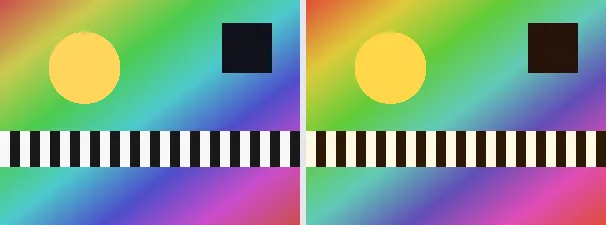
Colour temperature describes whether an image looks warm (reddish-orange, like candlelight or a sunset) or cool (bluish, like shade or an overcast sky). This tool shifts it with a single slider: to the right the image becomes warmer (more red, less blue), to the left cooler (more blue, less red).
Adjusting the colour temperature rescues shots with a wrong white balance (a too-blue shadow photo, too-orange artificial light) or deliberately sets a mood - golden hour or a cool evening scene. At temperature 0 the image is unchanged. The output keeps your original format and dimensions.
Everything runs entirely locally in your browser on a canvas (no upload, even offline) - your image never leaves your device. The shift moves the red and blue channels in opposite directions while the green channel is preserved. Animated images are flattened to a single frame.
Colour temperature is measured in kelvin - and, against everyday intuition: higher kelvin values (daylight, overcast sky) look cool and bluish, lower ones (candle, incandescent bulb) warm and orange. This control shifts exactly the blue-orange balance of the image, without touching the actual image content or the sharpness.
Choose the temperature (negative cooler, positive warmer; 0 unchanged).
Download the adjusted image (several at once as a ZIP).
Limitations: Shifts the colour temperature via a slider (-100 to 100): positive warmer (red up, blue down), negative cooler (reversed), 0 unchanged. The green channel is preserved. The original format and dimensions are preserved (PNG keeps transparency; JPEG flattens onto white). Animated inputs are reduced to a single frame.
FAQ
Is my image uploaded?
No. The adjustment runs entirely locally in the browser on a canvas - even offline. Your image never leaves your device.
Warm or cool - which is which?
Positive values make the image warmer (more red/orange), negative ones cooler (more blue). At 0 everything stays unchanged.
Does this replace a real white balance?
It is a quick, global red/blue correction, not a full white balance to a neutral reference - but it is enough for most cases.
Does it keep my format and size?
Yes. A PNG stays a PNG (with transparency), a JPEG stays a JPEG, and the dimensions are unchanged.