No processing of your file contents takes place on any server. You need no data-processing agreement with gottrix to handle confidential or business documents.
Hosted in GermanyGlobal Content Delivery
Origin servers at Hetzner in Germany, delivered worldwide through a content delivery network. Your file contents are never transmitted in the process - they never leave your device.
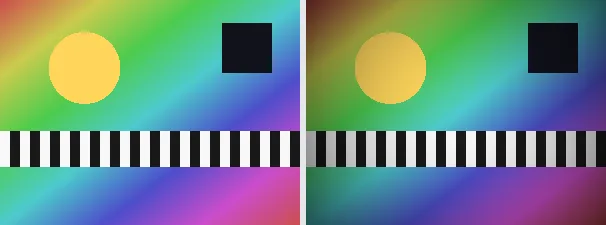
A vignette gently darkens the edges and corners of an image with a smooth radial falloff, leaving the centre bright. It is a classic photographic effect that focuses attention on the subject in the middle and gives a warm, framed feel. This tool applies a balanced vignette sized automatically to the image.
A vignette is useful for portraits, product shots, a vintage or cinematic look, or simply to draw the eye to the centre of a busy image. The output keeps your original format and dimensions - a PNG stays a PNG (with transparency), a JPEG stays a JPEG.
Everything runs entirely locally in your browser on a canvas (no upload, even offline) - your image never leaves your device. The vignette darkens toward the corners with a smooth gradient; the strength can be adjusted with a slider (default 60%) for a natural result. Animated images are flattened to a single frame.
The effect is purely tonal: the edge pixels are darkened, nothing is cropped or cut away - the whole subject stays visible, only the corners recede. The name comes from the natural light falloff of real lenses, which early photographers fought as a flaw and which is today used deliberately as a stylistic device.
A soft radial darkening is applied toward the edges on a canvas.
Download the vignetted image (several at once as a ZIP).
Limitations: Darkens the edges and corners with a smooth radial falloff toward the centre; the strength is adjustable via a slider (default 60%). The original format and dimensions are preserved (PNG keeps transparency; JPEG flattens onto white). Animated inputs are reduced to a single frame.
FAQ
Is my image uploaded?
No. The effect runs entirely locally in the browser on a canvas - even offline. Your image never leaves your device.
What is a vignette?
A vignette is a soft darkening of the edges and corners of an image, leaving the centre bright, which draws the eye to the middle and gives a framed, vintage feel.
How strong is it?
60% by default for a balanced, natural look with a smooth gradient toward the corners; use the slider to set the strength anywhere from 0 to 100%.
Does it keep my format and size?
Yes. A PNG stays a PNG (with transparency), a JPEG stays a JPEG, and the dimensions are unchanged.