en

Rotate Hue

Rotate the hue of an image locally by any angle - all colours shift together around the colour wheel. No upload.

    Rotation

    Drag the slider - the preview recolours live. Press "Apply" to save the result.

    Running locally on your device ...

    0%

    Your files never left your device

      Is my file uploaded?

      No. Everything runs in your browser - your file never leaves your device. How this is verifiable
      No upload100% local
      Your content stays with youno third-party access
      Servers in GermanyGDPR by design
      Independently auditedTLS A+ · HTTP headers A+

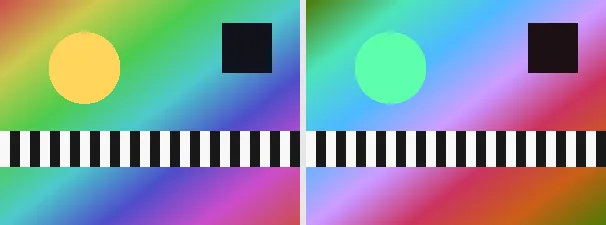
      Hue is the pure colour on the colour wheel - red, orange, yellow, green, blue and so on. This tool rotates the hue of every pixel by the chosen angle so that all colours shift together evenly: red becomes green at 120 degrees and blue at 240 degrees. Brightness and saturation are preserved while only the colour value travels.

      Rotating the hue is a quick way to try a whole new colour mood, move a scene into a different season, or create artistic false colours without selecting individual colours by hand. As soon as you drop an image you get a live preview: drag the slider and the whole image recolours instantly, so you land on exactly the right angle before you save. At 0 or 360 degrees the image is unchanged; 180 degrees gives the complementary colours. The output keeps your original format and dimensions.

      Everything runs entirely locally in your browser on a canvas (no upload, even offline) - your image never leaves your device. The rotation uses the standard luminance-preserving hue matrix, so neutral greys stay unchanged. Animated images are flattened to a single frame.

      Specifications

      Specifications
      Input formatsJPG, JPEG, PNG, WEBP
      Output formatJPG
      Batch processingYes
      ProcessingLocally in your browser (JavaScript)
      File uploadNone

      In 3 steps

      1. Drop or tap your image (PNG, JPEG or WebP).
      2. Choose the angle on the slider - the preview recolours live (0 to 360 degrees; 180 gives complementary colours).
      3. Download the recoloured image (several at once as a ZIP).

      Limitations: Rotates the hue of all pixels by the chosen angle (0 to 360 degrees) with the standard luminance-preserving hue matrix; 0 and 360 leave the image unchanged, 180 gives the complementary colours. Neutral greys stay the same. The original format and dimensions are preserved (PNG keeps transparency; JPEG flattens onto white). Animated inputs are reduced to a single frame.

      FAQ

      Is my image uploaded?

      No. The recolouring runs entirely locally in the browser on a canvas - even offline. Your image never leaves your device.

      What does 180 degrees do?

      A 180-degree rotation replaces every colour with its complementary colour on the wheel, while keeping brightness and saturation.

      Does the rotation change brightness?

      No. A luminance-preserving matrix is used, so perceived brightness stays the same; neutral greys do not change at all.

      Does it keep my format and size?

      Yes. A PNG stays a PNG (with transparency), a JPEG stays a JPEG, and the dimensions are unchanged.

      Related tools