No processing of your file contents takes place on any server. You need no data-processing agreement with gottrix to handle confidential or business documents.
Hosted in GermanyGlobal Content Delivery
Origin servers at Hetzner in Germany, delivered worldwide through a content delivery network. Your file contents are never transmitted in the process - they never leave your device.
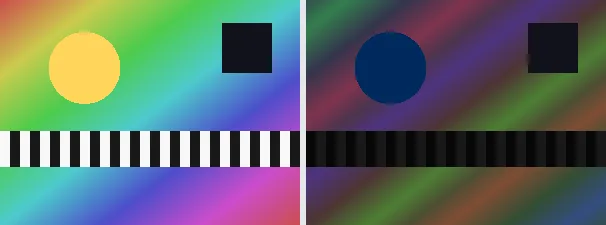
Solarization is a classic effect from the analogue darkroom in which part of the tonal range is reversed. This tool inverts every colour channel whose value is above the midpoint, while dark values stay unchanged. This creates the typical surreal colour shifts and metallic-looking highlights for which the effect is known.
Solarizing is useful for experimental, psychedelic or retro looks and to turn an ordinary photo into an unusual art image. Because only the bright parts are reversed, the image structure stays recognisable while the colours change dramatically. The output keeps your original format and dimensions.
Everything runs entirely locally in your browser on a canvas (no upload, even offline) - your image never leaves your device. The threshold sits fixed at the tonal midpoint; every channel value above it is inverted. Animated images are flattened to a single frame.
Technically only the tonal values above a threshold are inverted, the dark ones stay - it is exactly this partial inversion that produces the characteristic metallic transitions. The effect goes back to the Sabattier effect, a darkroom mishap (a brief flash of light during development) that photographers like Man Ray elevated into an art form.
Download the solarized image (several at once as a ZIP).
Limitations: Inverts every RGB channel value above the tonal midpoint (threshold 128); values below stay unchanged, giving the classic darkroom look. The original format and dimensions are preserved (PNG keeps transparency; JPEG flattens onto white). Animated inputs are reduced to a single frame.
FAQ
Is my image uploaded?
No. The effect runs entirely locally in the browser on a canvas - even offline. Your image never leaves your device.
What is solarization?
A darkroom effect in which part of the tonal range is reversed; here all channel values above the midpoint are inverted.
Is the whole image inverted?
No. Only bright values above the threshold are reversed; dark areas are kept, hence the typical mix.
Does it keep my format and size?
Yes. A PNG stays a PNG (with transparency), a JPEG stays a JPEG, and the dimensions are unchanged.