No processing of your file contents takes place on any server. You need no data-processing agreement with gottrix to handle confidential or business documents.
Hosted in GermanyGlobal Content Delivery
Origin servers at Hetzner in Germany, delivered worldwide through a content delivery network. Your file contents are never transmitted in the process - they never leave your device.
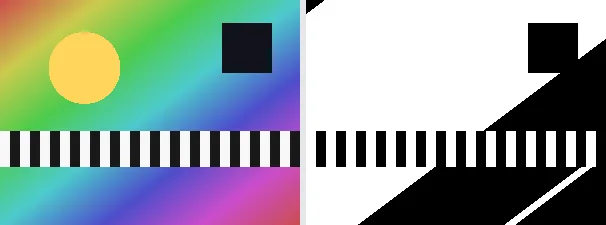
Thresholding converts an image to pure black and white using a single hard cutoff: each pixel becomes black or white depending on whether its brightness is below or above the midpoint. Unlike dithering, there is no dot pattern - edges are clean and solid, the classic high-contrast line-art look.
A thresholded image is useful for line art, stencils, high-contrast logos, scanned text or a stark graphic style. The output keeps your original format and dimensions - a PNG stays a PNG (with transparency), a JPEG stays a JPEG.
Everything runs entirely locally in your browser on a canvas (no upload, even offline) - your image never leaves your device. Thresholding converts to greyscale first, so colour is discarded; for a softer, shaded black and white use dithering instead. Animated images are flattened to a single frame.
The threshold itself is the boundary on the brightness scale from 0 to 255: everything below it becomes black, everything above it white. A low value leaves more white, a high one more black. Unlike with dithering, no midtones arise - which is exactly what makes the result ideal for line art and cleanly cuttable stencils.
It is converted to greyscale and split into black or white at the midpoint.
Download the black-and-white image (several at once as a ZIP).
Limitations: Converts an image to pure 1-bit black and white with an adjustable threshold (default: midpoint 128; no error diffusion, so no dot pattern - clean hard edges). The original format and dimensions are preserved (PNG keeps transparency; JPEG flattens onto white). Colour is discarded. Animated inputs are reduced to a single frame.
FAQ
Is my image uploaded?
No. The effect runs entirely locally in the browser on a canvas - even offline. Your image never leaves your device.
How is this different from dithering?
Thresholding uses one hard cutoff, giving clean solid black and white shapes. Dithering spreads the error into a dot pattern that simulates grey shades. Use the "Dither image" tool for that look.
Is colour kept?
No. The image is converted to greyscale before the cutoff, so the result is pure black and white.
Does it keep my format and size?
Yes. A PNG stays a PNG (with transparency), a JPEG stays a JPEG, and the dimensions are unchanged.