No processing of your file contents takes place on any server. You need no data-processing agreement with gottrix to handle confidential or business documents.
Hosted in GermanyGlobal Content Delivery
Origin servers at Hetzner in Germany, delivered worldwide through a content delivery network. Your file contents are never transmitted in the process - they never leave your device.
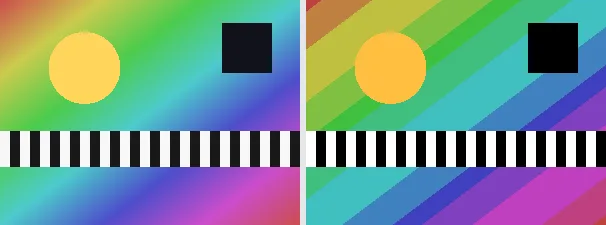
Posterizing reduces the number of tonal levels per colour channel, so smooth gradients collapse into a few flat bands. The result is the bold silk-screen or pop-art poster look. The number of levels can be set with a slider (default: 5 levels), giving a clear banded effect on any image.
A posterized image is useful for a graphic poster style, a retro or screen-print look, simplifying a photo into flat areas, or a base for further illustration. The output keeps your original format and dimensions - a PNG stays a PNG (with transparency), a JPEG stays a JPEG.
Everything runs entirely locally in your browser on a canvas (no upload, even offline) - your image never leaves your device. Posterizing discards subtle gradients by design in favour of flat bands, so fine shading is lost. Animated images are flattened to a single frame.
In contrast to dithering, which fakes midtones through distributed dots, posterizing deliberately leaves the bands hard: few levels per colour channel produce exactly the flat, poster-like effect. Fewer levels mean coarser bands and a more graphic look; more levels stay closer to the original and appear more finely graded.
Each colour channel is reduced to a few flat levels on a canvas.
Download the posterized image (several at once as a ZIP).
Limitations: Reduces each colour channel to an adjustable number of levels (default: 5, range 2 to 16), turning gradients into flat bands. The original format and dimensions are preserved (PNG keeps transparency; JPEG flattens onto white). Subtle shading is lost by design. Animated inputs are reduced to a single frame.
FAQ
Is my image uploaded?
No. The effect runs entirely locally in the browser on a canvas - even offline. Your image never leaves your device.
What does posterize do?
It cuts the number of brightness levels per colour channel, so smooth gradients become a few flat bands - the classic poster or pop-art look.
How many levels are used?
5 levels by default; use the slider to set 2 to 16 levels so the banding looks exactly the way you want.
Does it keep my format and size?
Yes. A PNG stays a PNG (with transparency), a JPEG stays a JPEG, and the dimensions are unchanged.