No processing of your file contents takes place on any server. You need no data-processing agreement with gottrix to handle confidential or business documents.
Hosted in GermanyGlobal Content Delivery
Origin servers at Hetzner in Germany, delivered worldwide through a content delivery network. Your file contents are never transmitted in the process - they never leave your device.
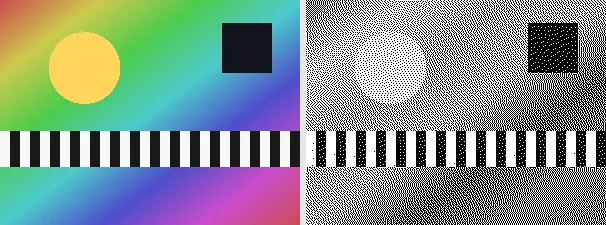
Dithering turns a greyscale image into pure black and white dots while preserving the impression of shades, the way old newspapers and 1-bit displays did. This tool uses Floyd-Steinberg error diffusion: for each pixel it picks black or white, then spreads the rounding error to neighbouring pixels, so a grey area becomes a fine pattern of dots that reads as that grey from a distance.
The result is a crisp, high-contrast, retro one-bit image - great for a vintage print look, e-ink style graphics, stylised avatars or stencils. The output keeps your original format and dimensions; for the crispest result use PNG, since saving the dotted pattern as JPEG can soften it slightly through compression.
Everything runs entirely locally in your browser on a canvas (no upload, even offline) - your image never leaves your device. Dithering first converts the image to greyscale, then diffuses the error, so colour is discarded by design. Animated images are flattened to a single frame.
Unlike a hard threshold, which simply cuts off midtones, dithering distributes each pixel's rounding error onto its neighbours (error diffusion). That way the eye mixes grey values back together from pure black-and-white dots at a distance - which is exactly why a dithered image looks softer and more detailed than a plain black-and-white threshold.
It is converted to greyscale and Floyd-Steinberg dithered to black and white.
Download the dithered image (use PNG for the crispest result).
Limitations: Dithers an image to one-bit black and white with Floyd-Steinberg error diffusion (greyscale first, then error spread to neighbouring pixels). The original format and dimensions are preserved; PNG keeps the dotted pattern crisp, JPEG may soften it. Colour is discarded. Animated inputs are reduced to a single frame.
FAQ
Is my image uploaded?
No. The dithering runs entirely locally in the browser on a canvas - even offline. Your image never leaves your device.
What is Floyd-Steinberg dithering?
An error-diffusion method: each pixel is set to black or white and the rounding error is spread to neighbouring pixels, so patterns of dots reproduce the impression of grey shades.
Which format should I save?
PNG keeps the one-bit dot pattern crisp. JPEG can soften it through compression, so prefer PNG for dithered images.
Is colour kept?
No. The image is converted to greyscale before dithering, so the result is pure black and white.