No processing of your file contents takes place on any server. You need no data-processing agreement with gottrix to handle confidential or business documents.
Hosted in GermanyGlobal Content Delivery
Origin servers at Hetzner in Germany, delivered worldwide through a content delivery network. Your file contents are never transmitted in the process - they never leave your device.
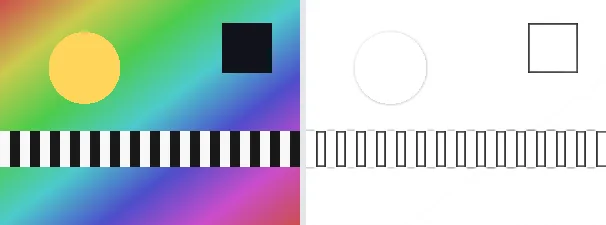
A pencil sketch turns a photo into a drawing that looks like graphite on white paper: the areas become light, while dark strokes appear at the edges and structures. The result emphasises outlines and detail while leaving the calm areas mostly white.
The classic sketch method converts the image to grayscale, inverts it, blurs the inversion softly and combines both via colour dodge - exactly the well-known photo-to-drawing trick. It suits portraits, buildings or templates to trace. The output keeps your original format and dimensions.
Everything runs entirely locally in your browser on a canvas (no upload, even offline) - your image never leaves your device. The result is a grayscale image; even areas become nearly white. Animated images are flattened to a single frame.
The effect works best on subjects with clear edges and good contrast - faces, buildings, objects against a calm background. Because the method emphasizes edges and lightens flat areas, fine gradients give way to the pencil impression; a very flat or heavily noisy photo accordingly yields a less convincing drawing.
Limitations: Converts the image to grayscale, inverts it, blurs the inversion softly and combines via colour dodge into a sketch look (R==G==B); even areas become nearly white. The original format and dimensions are preserved (PNG keeps transparency; JPEG flattens onto white). Animated inputs are reduced to a single frame.
FAQ
Is my image uploaded?
No. The sketch runs entirely locally in the browser on a canvas - even offline. Your image never leaves your device.
How does the effect work?
Grayscale, then a softly blurred inversion combined with the original via colour dodge - the classic photo-to-sketch trick.
Why is the result gray and light?
The sketch look is gray like graphite; calm areas become nearly white, only edges and structures remain as dark strokes.
Does it keep my format and size?
Yes. A PNG stays a PNG (with transparency), a JPEG stays a JPEG, and the dimensions are unchanged.