en

Detect Edges

Highlight the edges of an image locally - a Sobel filter draws outlines bright on a dark background. No upload.

Your files

    Running locally on your device ...

    0%

    Your files never left your device

      Is my file uploaded?

      No. Everything runs in your browser - your file never leaves your device. How this is verifiable
      No upload100% local
      Your content stays with youno third-party access
      Servers in GermanyGDPR by design
      Independently auditedTLS A+ · HTTP headers A+

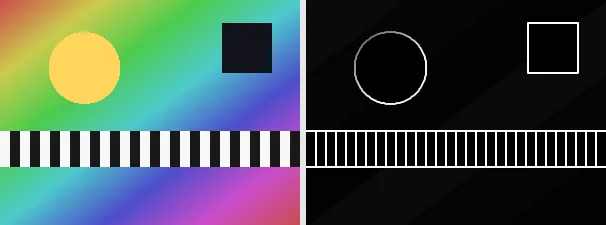
      Edge detection finds the places in an image where brightness changes sharply - that is, the outlines and contours of objects. This tool uses the classic Sobel operator and draws strong edges bright on a dark background, while even areas stay nearly black. The result is a graphic line drawing of the subject.

      Edge images are useful for artistic outline effects, as a template to trace, for technical analysis, or as a starting point for further editing. Because only brightness jumps count, colour disappears and the pure contours remain. The output keeps your original format and dimensions.

      Everything runs entirely locally in your browser on a canvas (no upload, even offline) - your image never leaves your device. The Sobel gradient magnitude is computed on the luminance; the result is a greyscale image of the edges. Animated images are flattened to a single frame.

      Specifications

      Specifications
      Input formatsJPG, JPEG, PNG, WEBP
      Output formatJPG
      Batch processingYes
      ProcessingLocally in your browser (JavaScript)
      File uploadNone

      In 3 steps

      1. Drop or tap your image (PNG, JPEG or WebP).
      2. The Sobel filter computes the edges on a canvas.
      3. Download the edge image (several at once as a ZIP).

      Limitations: Computes the Sobel gradient magnitude on the luminance, so strong edges become bright and flat areas nearly black (R==G==B); colour is lost. The original format and dimensions are preserved (PNG keeps transparency; JPEG flattens onto white). Animated inputs are reduced to a single frame.

      FAQ

      Is my image uploaded?

      No. The edge detection runs entirely locally in the browser on a canvas - even offline. Your image never leaves your device.

      Which method is used?

      The classic Sobel operator measures the brightness change in both directions and combines them into the edge strength.

      Why is the image dark?

      Flat areas without brightness jumps come out nearly black; only the edges light up, hence the dark background.

      Does it keep my format and size?

      Yes. A PNG stays a PNG (with transparency), a JPEG stays a JPEG, and the dimensions are unchanged.

      Related tools