en

Sharpen Image

Sharpen an image locally - emphasises edges and detail, format preserved. No upload.

Strength (%)

Your files

    Running locally on your device ...

    0%

    Your files never left your device

      Is my file uploaded?

      No. Everything runs in your browser - your file never leaves your device. How this is verifiable
      No upload100% local
      Your content stays with youno third-party access
      Servers in GermanyGDPR by design
      Independently auditedTLS A+ · HTTP headers A+

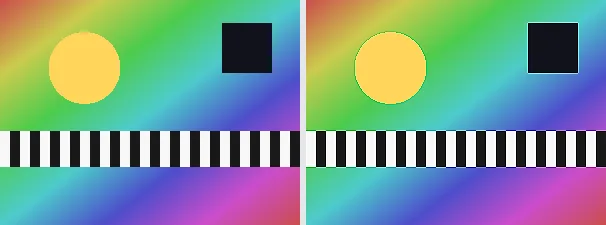
      Sharpening an image emphasises the transitions between light and dark, so edges and fine detail look more defined. This tool applies a classic 3x3 sharpen kernel: each pixel is boosted against its immediate neighbours, raising local contrast at edges while flat areas stay unchanged.

      Sharpening helps make a slightly soft photo look crisper, render text or texture more legible before sharing, or restore definition to a downscaled image. The output keeps your original format and dimensions - a PNG stays a PNG (with transparency), a JPEG stays a JPEG.

      Everything runs entirely locally in your browser on a canvas (no upload, even offline) - your image never leaves your device. Honestly framed: sharpening cannot invent detail that was not captured - it emphasises existing edges; over-sharpening can make noise or halos more visible. Animated images are flattened to a single frame.

      Specifications

      Specifications
      Input formatsJPG, JPEG, PNG, WEBP
      Output formatJPG
      Batch processingYes
      ProcessingLocally in your browser (JavaScript)
      File uploadNone

      In 3 steps

      1. Drop or tap your image (PNG, JPEG or WebP).
      2. A 3x3 sharpen kernel is applied to the image on a canvas.
      3. Download the sharpened image (several at once as a ZIP).

      Limitations: Sharpens an image with a 3x3 kernel whose strength is adjustable via a slider (default 100%; emphasises local contrast at edges; flat areas are unchanged). The original format and dimensions are preserved (PNG keeps transparency; JPEG flattens onto white). Sharpening does not invent missing detail. Animated inputs are reduced to a single frame.

      FAQ

      Is my image uploaded?

      No. The sharpening runs entirely locally in the browser on a canvas - even offline. Your image never leaves your device.

      Can sharpening rescue a blurry photo?

      Only to a degree. It emphasises existing edges and can make a slightly soft image look crisper, but it cannot create detail the camera did not capture.

      Does it keep my format and size?

      Yes. A PNG stays a PNG (with transparency), a JPEG stays a JPEG, and the dimensions are unchanged.

      What about the opposite, blurring?

      Use the "Blur image" tool, which blends each pixel with its neighbours instead of emphasising edges.

      Related tools