en

Add Noise

Add grainy noise to an image locally - for a film look or texture. No upload.

Amount

Your files

    Running locally on your device ...

    0%

    Your files never left your device

      Is my file uploaded?

      No. Everything runs in your browser - your file never leaves your device. How this is verifiable
      No upload100% local
      Your content stays with youno third-party access
      Servers in GermanyGDPR by design
      Independently auditedTLS A+ · HTTP headers A+

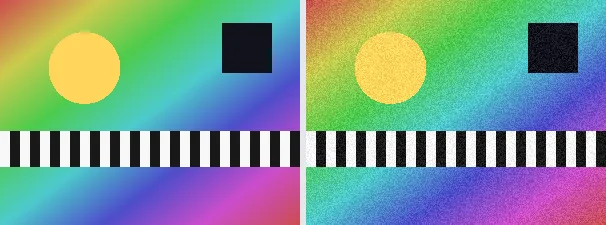
      Image noise is the fine, random grain that characterises analogue film and high-ISO camera shots. This tool adds it on purpose: each pixel gets a random brightness offset that is the same for all colour channels, so the colours are preserved and a monochrome grain appears.

      Noise is useful for an analogue film look, to make smooth digital gradients livelier, to mask banding, or to give a graphic some texture. The amount controls how strong the grain is; at 0 the image is unchanged. The output keeps your original format and dimensions.

      Everything runs entirely locally in your browser on a canvas (no upload, even offline) - your image never leaves your device. The grain is monochrome (the same offset on red, green and blue), so the colour impression is preserved. Animated images are flattened to a single frame.

      Specifications

      Specifications
      Input formatsJPG, JPEG, PNG, WEBP
      Output formatJPG
      Batch processingYes
      ProcessingLocally in your browser (JavaScript)
      File uploadNone

      In 3 steps

      1. Drop or tap your image (PNG, JPEG or WebP).
      2. Choose the noise amount (0 unchanged, 100 strong).
      3. Download the noisy image (several at once as a ZIP).

      Limitations: Lays monochrome random noise over the image; the amount (0 to 100) scales the maximum per-pixel brightness offset. The same offset hits red, green and blue, so colours are preserved; 0 leaves the image unchanged. The original format and dimensions are preserved (PNG keeps transparency; JPEG flattens onto white). Animated inputs are reduced to a single frame.

      FAQ

      Is my image uploaded?

      No. The processing runs entirely locally in the browser on a canvas - even offline. Your image never leaves your device.

      Does the noise change the colours?

      No. The grain is monochrome - the same offset is applied to all channels, so only the brightness fluctuates locally and the colours are preserved.

      What is this for?

      For an analogue film look, livelier gradients, masking banding, and texture on smooth areas.

      Does it keep my format and size?

      Yes. A PNG stays a PNG (with transparency), a JPEG stays a JPEG, and the dimensions are unchanged.

      Related tools