No processing of your file contents takes place on any server. You need no data-processing agreement with gottrix to handle confidential or business documents.
Hosted in GermanyGlobal Content Delivery
Origin servers at Hetzner in Germany, delivered worldwide through a content delivery network. Your file contents are never transmitted in the process - they never leave your device.
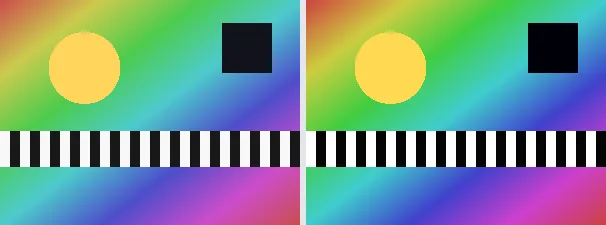
Auto contrast automatically stretches the tonal range of an image to the full span: the darkest existing tone becomes black, the brightest white, and everything in between is stretched evenly. Flat, low-contrast shots look crisper afterwards without you setting any slider.
It suits scans, hazy landscapes, underexposed snapshots, or any image that does not use the full black-to-white span. The stretch is applied equally to all colour channels, so the colour impression (hue) is preserved and only the contrast rises. The output keeps your original format and dimensions.
Everything runs entirely locally in your browser on a canvas (no upload, even offline) - your image never leaves your device. The darkest and brightest luminance are found, giving a linear stretch. An already flat image (all pixels equally bright) is left unchanged. Animated images are flattened to a single frame.
It is a pure histogram stretch: the existing tonal range is expanded to the full span, but no new detail is created - what was already blown out in an overexposed white stays white. Unlike with the manual contrast control, the tool determines the two endpoints automatically from the image itself.
The tonal range is stretched automatically on a canvas.
Download the higher-contrast image (several at once as a ZIP).
Limitations: Linearly stretches the tonal range so the darkest luminance maps to 0 and the brightest to 255; the same stretch hits all channels (hue is kept). A flat image (min equals max) is left unchanged. No slider. The original format and dimensions are preserved (PNG keeps transparency; JPEG flattens onto white). Animated inputs are reduced to a single frame.
FAQ
Is my image uploaded?
No. The auto contrast runs entirely locally in the browser on a canvas - even offline. Your image never leaves your device.
Does it change the colours?
The stretch is applied equally to all channels, so the hue is largely preserved; mostly the contrast increases.
Do I need a slider?
No. The full tonal range is derived automatically from the image; there is deliberately no slider.
Does it keep my format and size?
Yes. A PNG stays a PNG (with transparency), a JPEG stays a JPEG, and the dimensions are unchanged.